You publish every week
A long video, a few clips cut from it, and the same upload routine on each channel. SocialCobalt turns that routine into one step.
Scheduling for video creators
Schedule your video once and it goes out on time on every channel you connect. Long videos and short clips, from one calendar.
 YouTube
 TikTok
 Instagram


Inside SocialCobalt
See what goes out, where and when. Move a video to another slot by dragging it.
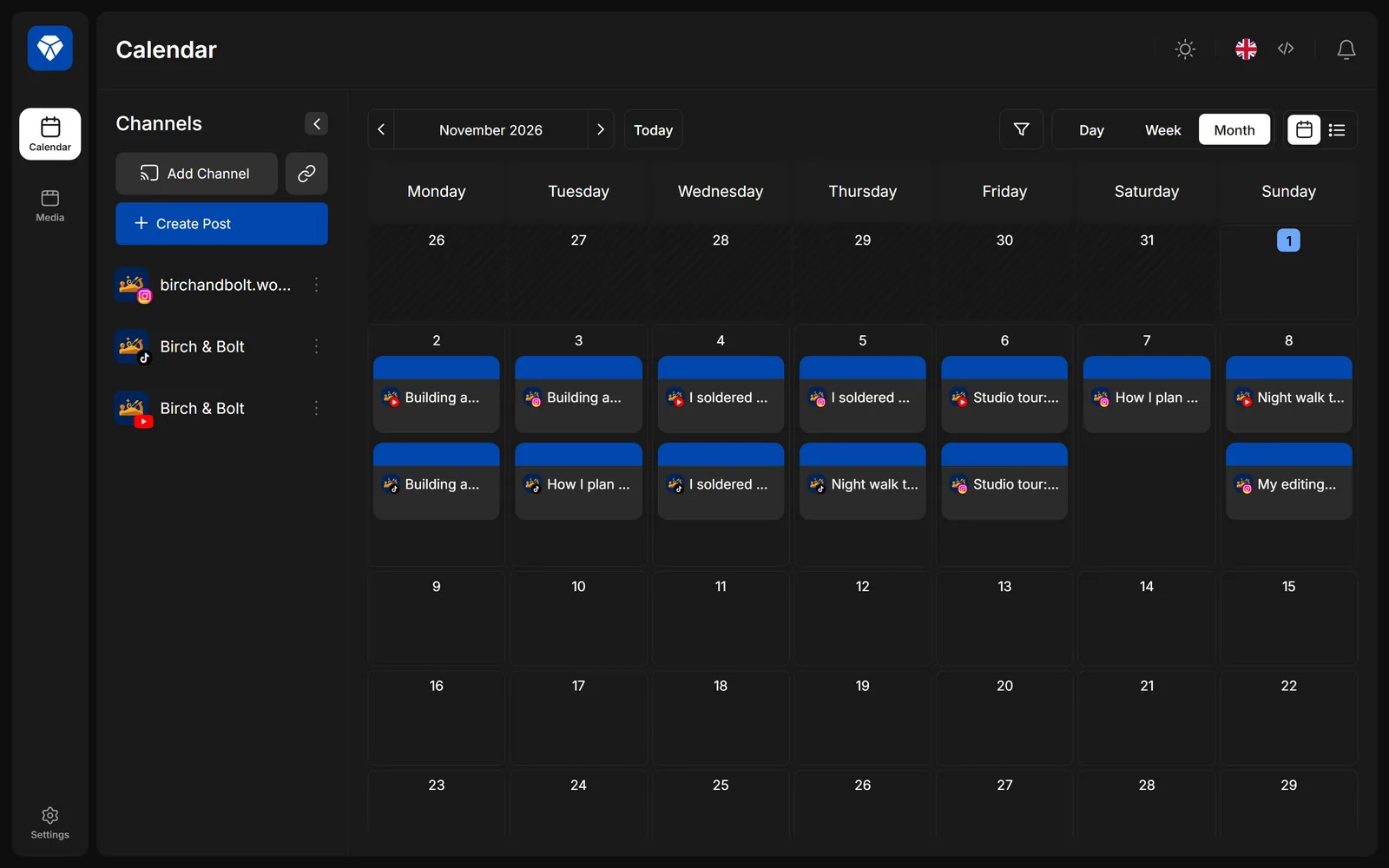
Screens from the SocialCobalt app, with example channels and videos.
Who it's for
A long video, a few clips cut from it, and the same upload routine on each channel. SocialCobalt turns that routine into one step.

Pick the slot, add the channels and move on to the next edit. The upload happens at the time you chose.

Priced per creator, not per seat in a marketing team. The smallest plan covers five channels.

How it works
Sign in to each network through its own login page. SocialCobalt never sees your password.
Add the video, write the caption for each channel and choose a time, or take the next free slot.
Each channel gets its post at its time. If an upload fails, you get a notification that says what happened and what to do.
What's inside
Every scheduled video by day, week or month. Drag a post to move it to another time.
Set the times each channel usually posts. New videos can go straight to the next open slot.
Send a link to a collaborator or a sponsor. They see the post as it will go out and can leave comments.
Save the channels, captions and links you repeat, and reuse them on the next upload.
Group channels when you run more than one show, and filter the calendar to one show at a time.
Schedule from your own scripts, and get notified when a post goes out.
Channels
Each network reviews apps before they can publish for you. We list a network as available only after it approves SocialCobalt.
Long videos and Shorts, with title, description, tags, privacy and thumbnail.
Short videos with caption and privacy settings, posted to your own account.
Reels and feed posts for professional accounts.
SocialCobalt is not affiliated with or endorsed by YouTube, TikTok or Instagram. The names and logos belong to their owners.

Pricing
5 channels
15 channels
40 channels and a team
Questions
Not yet. Each network is reviewing SocialCobalt. When a network approves it, we mark it as available on this page and you can connect that channel.
You connect each channel through the network's own login, so we never see your password. The access keys the network gives us are stored encrypted, and we use them only to publish what you schedule and to read the results of your own posts.
You can disconnect a channel at any time in SocialCobalt, or remove our access in the network's own security settings.
No. SocialCobalt makes sure your video goes out when you planned. Reach depends on the video and on each network.
Delete your account in Settings, or write to us. The steps and what we keep are on the data deletion page.
SocialCobalt started as the publishing setup behind one solo channel, shipping long videos and short clips every week. It grew into a tool for anyone who would rather edit than upload.
Set up your channels and schedule the next upload.
Get started